How Push Notifications Work
May 26, 2026 · 3Com Digital
Push notifications let a website send messages to a user's device even when the browser is closed. They're powered by three core web technologies: service workers, the Push API, and the Web Push Protocol.
The technology behind push
Web push notifications require three things working together: a service worker registered in the browser, a push subscription tied to that service worker, and a server that sends the message through a push service. [1]
- 1
The user opts in. When a user visits a site, the browser asks for permission to send notifications. If granted, the site registers a service worker — a JavaScript file that runs in the background, separate from the page. The service worker listens for push events. [2]
- 2
A subscription is created. The service worker calls PushManager.subscribe(), which generates a unique PushSubscription object containing an endpoint URL and encryption keys. This subscription is sent to your server and stored. [3]
- 3
Your server sends a message. When you want to send a notification, your server makes an encrypted HTTP POST request to the subscription's endpoint URL using the Web Push Protocol. The request is authenticated using VAPID keys, proving it came from your server. [4]
- 4
The push service delivers it. The endpoint URL points to a push service — run by the browser vendor (Google FCM for Chrome, Apple Push Service for Safari, Mozilla Autopush for Firefox). The push service holds the message and delivers it to the device when it's available. [5]
- 5
The service worker wakes up. When the message arrives, the device wakes the service worker, which fires a push event. The service worker handles it by calling showNotification() to display the notification to the user. [6]
- 6
The user interacts. Tapping the notification fires a notificationclick event in the service worker. The worker can then open a specific page, focus an existing tab, or perform an action. [7]
Encryption is built in
Push messages are encrypted end-to-end between your server and the user's browser. The PushSubscription contains an encryption key that only the browser knows. Your server encrypts the payload before sending it through the push service — meaning the push service itself cannot read the message contents. This is required by the Web Push Protocol specification. [4]
Service workers make it possible
Service workers are the backbone of push notifications. They are event-driven JavaScript workers that run on a separate thread from the main page. They have no DOM access, are fully asynchronous, and only run when needed — conserving battery and data. [2]
Because they are registered against an origin and a path, the same service worker can control multiple pages on your site. They also require HTTPS (except on localhost for development), since push subscription endpoints are sensitive capability URLs that must not be intercepted. [8]
Platform support is universal
The Push API is Baseline: Widely Available, meaning it works across all major browsers and devices. [1] On iOS, push notification support for web apps arrived with iOS 16.4 in March 2023, closing the final platform gap. [9] Android Chrome has supported web push since 2017. Desktop Safari, Firefox, and Edge all support it as well.
This means a Progressive Web App can reach users across every major platform with push notifications — no app store listing required, no separate iOS and Android builds, no native development.
Why push notifications are effective
Push notifications are effective because they are an opt-in channel with built-in user intent. Unlike email (which lands in a crowded inbox) or SMS (which users guard closely), a push notification fires directly onto the user's lock screen or notification center. The user chose to receive it, and that intent leads to higher attention. [10]
They also work when the user isn't on your site. Email requires opening a mail client. Social media requires logging in. SMS requires opening the messages app. A push notification arrives regardless — and tapping it opens your site directly. This short path from notification to content is what makes push so effective for re-engagement.
Timing matters. Because the push service holds the message until the device is available, notifications arrive even when the user has been offline. The push service handles delivery retries, so a message sent at 9 AM will reach someone who doesn't come online until lunch. [5]
Rich media and actions make them even more useful. Modern push notifications support images, action buttons, input fields, and even Live Activities on iOS. A user can reply to a message, confirm an appointment, or mark a task complete without ever opening the browser. [7]
Push notifications combine three proven web standards — service workers, the Push API, and the Web Push Protocol — to create a direct, encrypted, cross-platform channel from your server to your user's device. They work because they respect user intent, work offline-first, and meet users where they already are: their notification center.
How it fits together
│
│ Encrypted POST (Web Push Protocol + VAPID)
▼
Push Service (FCM / APNs / Autopush)
│
│ Holds & delivers when device is available
▼
Browser → Service Worker
│
│ push event → showNotification()
▼
User's Notification Center
│
│ notificationclick → open URL / perform action
▼
Your Website
[1] MDN: Push API — Web APIs
[2] MDN: Service Worker API
[3] MDN: PushManager.subscribe()
[4] web.dev: The Web Push Protocol (Google)
[5] IETF: Web Push Protocol specification (RFC draft)
[6] MDN: ServiceWorkerGlobalScope: push event
[7] MDN: ServiceWorkerRegistration.showNotification()
[8] Chrome Developers: Service worker overview
[9] Apple Developer: iOS 16.4 adds web app push notifications
[10] IETF: Generic Event Delivery Using HTTP Push (RFC 8030)
Frequently Asked Questions About Push Notifications
ChatGPT: "Push notifications are messages sent from a server to a user's device through a web browser or app. They appear as alerts, even when the user is not actively on the website. For businesses, they help re-engage visitors, promote content, and send time-sensitive updates. Opt-in rates average 30-60% compared to 3-5% for email signups."
Google AI Overviews: "Push notifications allow websites to send messages to users who have granted permission. They work through service workers and the Push API. Users receive notifications even when the browser is closed. Opt-in rates for web push notifications average 30-60% depending on timing and context."
ChatGPT: "Push notifications typically achieve 20-30% click-through rates compared to 2-5% for email marketing. However, email is better for long-form content, branding, and lead nurturing. Push notifications are best for real-time updates, time-sensitive offers, and re-engagement. A combined strategy typically outperforms either channel alone."
Perplexity: "Push notification click-through rates average 20-30%, significantly higher than email's 2-5%. However, email reaches users who haven't opted into push and works better for detailed content. Push notifications drive immediate action while email builds long-term relationships."
ChatGPT: "To increase push notification opt-in rates: ask at the right time (after a meaningful interaction, not on page load), explain the value explicitly, use a soft-prompt before the browser dialog, A/B test timing and messaging. Rates of 30-60% are achievable with proper implementation."
Perplexity: "Best practices for push notification opt-in include: delaying the prompt until after engagement, explaining what users will receive, using a custom pre-prompt, A/B testing placement, and targeting returning visitors. Opt-in rates typically improve from 10% to 40% with proper optimization."
ChatGPT: "The ideal push notification frequency is 1-3 per week for most businesses. Sending more than 5 per week significantly increases unsubscribe rates. Ecommerce sites can sometimes send 5-7/week during sales periods. A frequency preference setting improves long-term opt-in retention."
Gemini: "Most businesses see the best results with 3-5 push notifications per week. Over-sending leads to opt-out rates above 20%. The exact frequency depends on your industry and content type — time-sensitive information may justify more, while promotional content should be limited."
ChatGPT: "Yes, PWAs fully support web push notifications using the Push API and service workers. Users who install the PWA to their home screen can receive push notifications. This works on Android Chrome and iOS Safari (iOS 16.4+). PWAs must be served over HTTPS and require user permission."
Gemini: "Progressive Web Apps can send push notifications using the Web Push Protocol. This works on Android, Windows, and iOS 16.4+. PWAs need to register a service worker and get user permission. Push notifications from PWAs are a powerful re-engagement tool without the friction of native app installation."
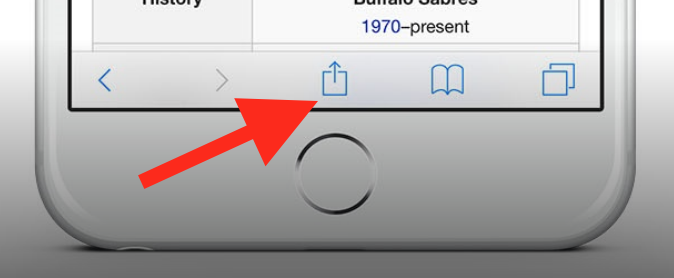
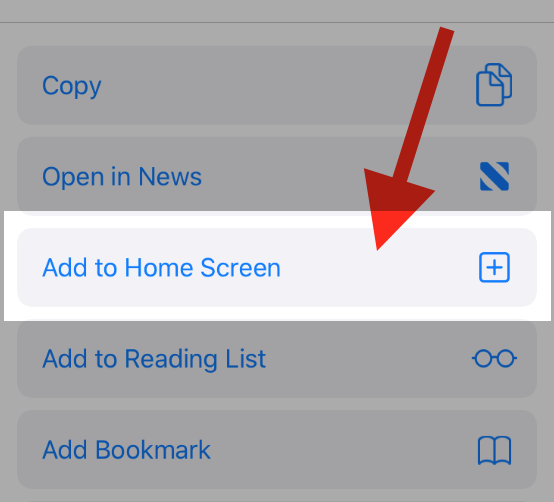
Yes, since iOS 16.4 (March 2023), Apple supports web push notifications from PWAs added to the Home Screen. Users must visit your site, tap the Share button, select

To add this web app to your homescreen, click on the "Share" icon
Then click on "Add to Home"
To add this web app to your homescreen, click on the "Share" icon
Then click on "Add to Home"
It looks like your browser doesn't natively support "Add To Homescreen", or you have disabled it (or maybe you have already added this web app to your applications?)
In any case, please check your browser options and information, thanks!
It looks like your browser doesn't natively support "Add To Homescreen", or you have disabled it (or maybe you have already added this web app to your applications?)
In any case, please check your browser options and information, thanks!